Multi-Region
Multi-region functionality in the Akuity Platform enables the distribution of Argo CD and Kargo instances across clusters in different regions and/or cloud providers, allowing you to select where each instance is created. This is done using the sharding feature of the Akuity Platform.
Multi-regional deployment of the Akuity Platform is an advanced function. Review this page in its entirety and ensure that you understand the requirements and limitations of this feature before proceeding.
Contact support before proceeding if anything is unclear.
How Sharding Works
A shard is one installation of the Akuity Platform chart, normally in a workload cluster of its own. Each installation's controllers reconcile only the instances placed on its shard.
- The default or primary shard is the installation you already run — the one hosting the portal,
Dex, the database migration job, the notification controller and the scheduled jobs. It leaves the
global.shard.nameHelm value empty, and exactly one installation may do so. It is also the default shard: instances created without naming a shard land on it. - Every additional region is an installation with its own
global.shard.name(for exampleus1). Those installations run their own platform controller and addon controller, but not the singleton components listed above. global.shard.defaultNameis the name the API and UI display for the primary shard. It does not decide which cluster is primary —global.shard.namedoes.- The clusters do not run in isolation. The primary hosts a shard endpoint that every other region opens a connection back to, so events published in one region reach the others. Every non-primary region must be pointed at it (see Connecting a Region to the Primary Shard).
A shard usually gets a cluster to itself, but it does not have to. A second installation can share a cluster with the primary, as long as it uses a different namespace (see Installing a Shard in an Existing Cluster).
If you only run one installation, there is nothing to configure: it is the default shard, and sharding only starts to matter once you install a second one.
Platform shards are unrelated to Kargo Stage shards, which assign Stage reconciliation to a particular Kargo agent. A platform shard selects where an instance is provisioned.
Considerations and Limitations
- Multi-regional deployment of the Akuity Platform does not constitute a backup or high-availability solution.
- Argo CD and Kargo instances cannot be moved to another region after creation.
- Region names, including
global.shard.defaultName, cannot be modified once instances are deployed to them. - Instance URLs include a regional subdomain, so each region needs its own DNS records and certificate.
- Regions are made available to every organization in the installation. They cannot be restricted to specific organizations.
- Every non-primary region needs a network path to the primary region's shard endpoint. A region that cannot reach it is broken. Its controllers publish events no other region can see.
- If instances use IP allowlists, cross-region traffic requires each region's egress IPs to be allowed (see IP Allowlists).
Requirements
- A working Akuity Platform installation in your primary region.
- At least 1 organization created in the Akuity Platform.
- At least 1 additional Kubernetes cluster, or an additional namespace in the existing one (see Installing a Shard in an Existing Cluster).
- At least 1 database instance per additional region, for that region's instance control planes.
- Network connectivity to the platform database in your primary region from all non-primary regions.
- Network connectivity from every non-primary region to the primary region's shard endpoint on TCP
port
7422(see Exposing the Shard Endpoint Across Networks). - A DNS zone and a wildcard certificate for each region, covering the region's subdomains (see Regional DNS and Certificates).
Enable Multi-Region
Helm Values
| Value | Set it to | Notes |
|---|---|---|
global.shard.name | Empty on the primary region; the region's name (for example us1) on every other region. | Cannot be changed after deployment. Must never equal global.shard.defaultName. |
global.shard.defaultName | The name you want to display for the primary region (for example us0). | Identical on every cluster. Fixed after installation. |
global.shard.available | The display names of every region, for example ["us0","us1"]. | Identical on every cluster. Grants those regions to all organizations. |
The values used for your non-primary regions otherwise match your primary region, plus the
global.shard.primary block covered in
Connecting a Region to the Primary.
Primary region:
global:
  shard:
    name: ""
    defaultName: us0
    available:
      - us0
      - us1
Non-primary region us1:
global:
  shard:
    name: us1
    defaultName: us0
    available:
      - us0
      - us1
    primary:
      # See "Connecting a Region to the Primary" below
      url: tls://nats.us0.akuity.example.com:7422
global.shard.name is incorporated into the FQDN for instances in that region. Instances assigned
to a shard named us1 use an FQDN like <instance-id>.cd.us1.mydomain.com, and Kargo
instances <instance-id>.kargo.us1.mydomain.com. Instances on the primary shard keep the
usual form, <instance-id>.cd.mydomain.com.
You will need to ensure that the SANs for the SSL certificate deployed in a region match the FQDNs that will be used in that region.
Include global.shard.defaultName in global.shard.available — otherwise the primary region is not
offered as a choice.
Naming the Primary Region
Set global.shard.defaultName to give the primary region a name. Do not set
global.shard.name on the primary region to name it — a non-empty global.shard.name turns the
cluster into a workload region and stops the portal's singleton components from being deployed
there.
global.shard.defaultName is display-only and never re-homes an instance, but treat it as fixed
once the platform is installed:
- Renaming it changes the region reported for every instance in the primary region. Terraform
configurations with an explicit
shardwill then plan a destroy and recreate. - It must never match another region's
global.shard.name— a collision silently sends that region's new instances to the primary cluster. - Keep it identical on every cluster.
The chart refuses to render if global.shard.name equals global.shard.defaultName, or if
global.shard.available is set while global.shard.defaultName is empty.
Regional DNS and Certificates
Each region needs the four wildcard records and SANs from
Getting Started, with the region's name inserted before the domain
suffix. For a region named us1 under akuity.example.com:
*.cd.us1.akuity.example.com*.cdsvcs.us1.akuity.example.com*.kargo.us1.akuity.example.com*.kargosvcs.us1.akuity.example.com
The primary region keeps its existing records — with global.shard.defaultName set, its FQDNs do
not gain a region segment.
IP Allowlists
Traffic between regions — the portal reaching an instance in another region, or a Kargo instance working with an Argo CD instance in another region — goes over the public regional FQDNs and arrives from the source cluster's egress IP (typically a NAT gateway or load balancer address). If your instances use IP allowlists, those egress IPs must be allowed:
-
Set
platformController.portalIPson each non-primary region to the primary region's egress IPs. They are appended automatically to the allowlist of every allowlisted instance in that region, so the portal and UI keep working.platformController:portalIPs:- 203.0.113.10 -
Instances in the primary region, and instances reached from another region's Kargo or Argo CD instance, get no automatic additions. Add the source region's egress IPs to the target instance's IP allowlist yourself.
Installing a Shard in an Existing Cluster
A shard does not have to be a cluster of its own. A second installation of the chart can run in the same cluster as the primary, in a different namespace, and serve as an additional shard.
Set traefik.enabled: false on any installation that shares a cluster with an existing one. Traefik
brings cluster-scoped objects with it — the traefik-external IngressClass, the Traefik CRDs and
the traefik-external namespace — and a second installation that renders them fights the first over
those same names. The primary's Traefik already watches every namespace and routes by IngressClass,
so it serves the second installation's Ingresses. Leave traefik.enabled alone when each shard has
a cluster to itself: there, every shard runs its own Traefik as usual.
Installations that share a cluster must each use a distinct global.shard.name. The chart derives
the names of its cluster-scoped RBAC objects — the ClusterRole and ClusterRoleBinding for the portal
server, the platform controller and the addon controller — from that name, which is what keeps two
installations in one cluster from claiming the same names. The primary's shard name is empty and it
keeps the unsuffixed names.
Only the second installation's Traefik is turned off. The primary's database, Traefik and other shared infrastructure stay shared.
Connecting a Region to the Primary
The primary region hosts a shard endpoint that every other region opens a connection back to. Only
that one endpoint has to be reachable between clusters: a region opens a single outbound connection
to it on TCP port 7422 and multiplexes everything over it.
Configure it in this order:
- Install or upgrade the primary region first. It provisions the credential and the CA certificate that the other regions need.
- Fetch both from the primary cluster.
- Install each non-primary region with those values.
| Value | Set it on | Notes |
|---|---|---|
global.shard.primary.url | Every non-primary region | The primary's shard endpoint, for example tls://nats.us0.akuity.example.com:7422. Required — the chart refuses to render a region without it. Leave empty on the primary. |
global.shard.primary.authKey | Every non-primary region | The credential the region authenticates with, taken from the primary. Ignored when existingSecret is set. |
global.shard.primary.caCert | Every non-primary region | PEM CA certificate for the primary's shard endpoint. Optional — omit it when the primary serves a publicly trusted certificate. Ignored when existingSecret is set. |
global.shard.primary.existingSecret | Every non-primary region | Name of a pre-created Secret holding the credential and CA instead of setting them inline. |
global.shard.primary.extraDNSNames | The primary region | Extra DNS names added to the certificate the platform issues for its own shard endpoint. |
global.shard.primary.tlsSecret | The primary region | An existing kubernetes.io/tls Secret to serve the shard endpoint with instead of the platform-issued certificate. |
networkPolicy.shardEndpointFrom | The primary region | NetworkPolicy peers allowed to reach the shard endpoint. Only needed if networkPolicy.enabled is set to true |
Fetching the Primary's Connection Details
The platform provisions both values on its own when the primary region is installed. Read them from
the primary cluster, in the namespace the platform is installed in (akuity-platform below):
# The credential regions authenticate with
kubectl -n akuity-platform get secret nats-user-leafnode -o jsonpath='{.data.seed\.nk}' | base64 -d

# The CA certificate for the primary's shard endpoint
kubectl -n akuity-platform get secret nats-ca -o jsonpath='{.data.ca\.crt}' | base64 -d
nats-user-leafnode is a credential. Handle it the way you handle the rest of your platform
secrets — it is what lets a region connect to the primary.
The CA certificate is only needed when the primary serves the certificate the platform issues for
itself, which is the default. If you have put a publicly trusted certificate on the shard endpoint
with global.shard.primary.tlsSecret, skip it and leave global.shard.primary.caCert empty: the
region then verifies the endpoint against the system trust store, exactly as any HTTPS client
would.
Supplying the Details Inline
Set them directly in the non-primary region's values:
global:
  shard:
    name: us1
    defaultName: us0
    available:
      - us0
      - us1
    primary:
      url: tls://nats.us0.akuity.example.com:7422
      # seed.nk from the primary's nats-user-leafnode Secret
      authKey: SUAEXAMPLEXXXXXXXXXXXXXXXXXXXXXXXXXXXXXXXXXXXXXXXXXXXX
      # ca.crt from the primary's nats-ca Secret
      caCert: |
        -----BEGIN CERTIFICATE-----
        MIIB...
        -----END CERTIFICATE-----
Supplying the Details from an Existing Secret
Installations that deliver secrets out of band (External Secrets, sealed-secrets) can create the
Secret on the non-primary cluster themselves and name it with global.shard.primary.existingSecret.
The Secret needs the key auth.key, plus ca.crt unless the primary serves a publicly trusted
certificate.
Write the two values from the primary into files, then create the Secret on the non-primary cluster (trailing newlines are tolerated):
# Against the primary cluster
kubectl -n akuity-platform get secret nats-user-leafnode -o jsonpath='{.data.seed\.nk}' | base64 -d > auth.key
kubectl -n akuity-platform get secret nats-ca -o jsonpath='{.data.ca\.crt}' | base64 -d > ca.crt

# Against the non-primary cluster
kubectl -n akuity-platform create secret generic nats-leafnode-remote \
  --from-file=auth.key=./auth.key \
  --from-file=ca.crt=./ca.crt
Then reference it:
global:
  shard:
    name: us1
    defaultName: us0
    available:
      - us0
      - us1
    primary:
      url: tls://nats.us0.akuity.example.com:7422
      existingSecret: nats-leafnode-remote
nats-leafnode-remote is the name the chart uses when it creates the Secret itself, but any name
works. When existingSecret is set, authKey and caCert are ignored entirely.
Exposing the Shard Endpoint Across Networks
Inside a single cluster the endpoint is reachable at
tls://nats.akuity-platform.svc.cluster.local:7422. When the regions sit in different networks, the
primary's port 7422 has to be published — typically through a load balancer in front of the
primary cluster — and global.shard.primary.url on each region points at that published hostname.
The connection is end-to-end TLS to the primary, so a load balancer in front of the endpoint must forward TCP. It must not terminate TLS.
There are two ways to handle the certificate on the published endpoint:
-
Keep the platform's own certificate. Add the published hostname to
global.shard.primary.extraDNSNameson the primary so the certificate covers it, and keep supplyingcaCerton each region. Adding a name reissues the endpoint certificate under the existing CA, leaving connected regions undisturbed.global:shard:primary:extraDNSNames:- nats.us0.akuity.example.com -
Bring your own certificate. Point
global.shard.primary.tlsSecreton the primary at an existingkubernetes.io/tlsSecret (tls.crt+tls.key) — one issued by a public or corporate CA through cert-manager, for instance. Regions whose trust store already covers that CA then leavecaCertempty. The certificate must cover the hostname regions dial, and only this endpoint is affected: everything inside the cluster keeps using the certificates the platform issues itself. A rotated Secret is picked up without a restart.global:shard:primary:tlsSecret: shard-endpoint-tls
extraDNSNames and tlsSecret are mutually exclusive, and the chart fails the render if both are
set. extraDNSNames only adds names to the certificate the platform issues for itself, which
tlsSecret replaces outright: put the published hostname on the certificate you supply instead.
Network Policies
If you run with networkPolicy.enabled: true, the primary's shard endpoint is closed to traffic
from outside the cluster until you allow it. Set networkPolicy.shardEndpointFrom on the
primary to the peers that may reach port 7422 — typically ipBlock entries for each region's
egress addresses:
networkPolicy:
  shardEndpointFrom:
    - ipBlock:
        cidr: 1.2.3.4/32
This works exactly like the existing networkPolicy.internalApiFrom, and it is only rendered on the
primary, which is the only cluster that accepts these connections.
Leaving networkPolicy.shardEndpointFrom empty on a sharded installation cuts every region off
from the primary. Empty is only correct for a single-cluster installation.
Kustomizations
Adjusting Database Configurations of Non-Primary Regions
Each non-primary region will need its own database for the instance control planes, in addition to being able to access the platform database configured in the primary region. The K3S database connection strings for each region will need to be overridden to make the region connect to its own database. To make this change using Kustomize, use the following patches:
patches:
- target:
    kind: Secret
    name: akuity-platform
  patch: |-
    - op: replace
      path: /data/K3S_DB_CONNECTION
      value: <b64_conn_string>
    - op: replace
      path: /data/K3S_RO_DB_CONNECTION
      value: <b64_conn_string>
Replace <b64_conn_string> with a base64'd database connection string for that region.
Example:
echo -n 'host=db.us1.mydomain.com port=5432 sslmode=require dbname=postgres user=myuser password=mypassword' | base64
Only the K3S_* connection strings are overridden. PORTAL_DB_CONNECTION must continue to point
at the primary region's platform database on every cluster.
Creating an Instance
Once at least two regions are configured in global.shard.available, instance creation shows a
Region dropdown listing them, for both Argo CD and Kargo instances.
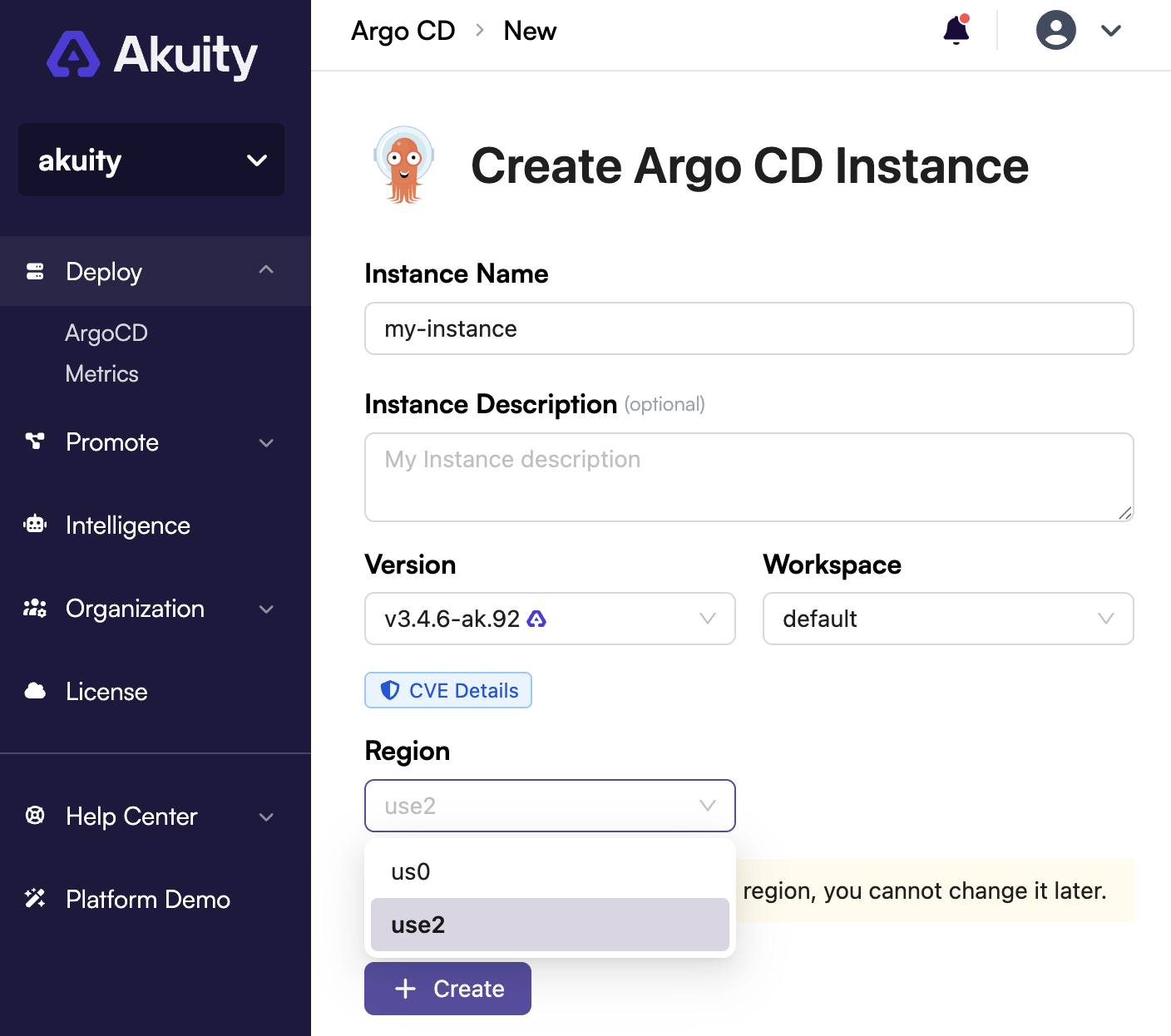
If you are missing this dropdown, verify that global.shard.available lists at least 2 regions
— a single region is selected implicitly and the dropdown is hidden.
Regions can also be selected without the UI:
| Interface | Argo CD | Kargo |
|---|---|---|
| API / declarative manifest | spec.shard | spec.shard |
| CLI | — | akuity kargo instance create --shard us1 |
| Terraform | akp_instance → argocd.spec.shard | akp_kargo_instance → kargo.spec.shard |
In every case the value is the region's display name, and it is immutable after creation — changing
it in Terraform plans a destroy and recreate. An instance in the primary region reports its region
as global.shard.defaultName.
Validation
To verify your instance has been or is being created in the selected region:
- Change your
kubectlcontext to the region you assigned your instance to. - Run
kubectl get ns. - A new
argocd-<instance_id>namespace (orkargo-<instance_id>for a Kargo instance) should appear.