Secrets
The Akuity Platform provides a way to manage and synchronize secrets between the control plane and your Kubernetes clusters. This capability is built in to the platform and requires no additional configuration to enable in your clusters.
The Akuity Platform's secret syncing feature is designed for convenience and is not as a comprehensive secret management solution. It's best suited for syncing a small number of secrets for Argo CD use cases, such as repository credentials or notification secrets.
For proper secrets management, consider using a dedicated solution like External Secrets Operator (ESO) or OpenBao.
Overview
Secrets management has two main components:
- Syncing secrets from your managed clusters to be used by the Argo CD control plane hosted on the Akuity Platform.
- Syncing secrets from the Argo CD control plane to your managed clusters.
Additionally, the settings tab can now create what are called "managed secrets." This is a shortcut for creating Argo CD secrets without needing to access the Argo CD dashboard directly (though they can still be managed there as well).
These features can be used separately or together, depending on your needs.
Syncing Secrets to the Argo CD Control Plane
Selecting which Secrets to Sync
For security, secrets will not synced unless explicitly allowed by a control plane administrator. This can be done in the "Secrets" settings of the instance as shown below:
Allowed secrets are configured by creating a Secret Source. A Secret Source has two fields, one of which must always be set:
- Cluster Selector: A label selector for a clusters you wish to sync secrets from. The labels for the cluster are specified when connecting a cluster to the Akuity Platform. If this field is left empty, then the Label Selector will match secrets from all clusters.
- Label Selector: A set-based label selector for the secrets you wish to sync. If this field is left empty, then the Label Selector will match all secrets for all matching clusters
You can use both Cluster and Label selectors to select specific secrets from specific clusters for more fine grained control
Creating Secrets
If you create a secret syncing selector after creating a secret in Kubernetes, the secret will not sync until Kubernetes resyncs or you reapply the secret. This is due to the limitation of the Kubernetes API, which only informs when a secret is updated/created.
To sync secrets from your managed clusters to the Argo CD control plane, you need to create a secret in your managed cluster with the appropriate labels. The Akuity agent will automatically detect these secrets and sync them to the Argo CD control plane.
Secrets must be created in the Agent namespace within a managed cluster (akuity by default) and
must have the label akuity.io/secret-sync: "true" to opt-in to syncing.
- Argo CD Secrets (repo-creds, repository)
- Arbitrary Secrets
For Argo CD repository credentials, add the standard argocd.argoproj.io/secret-type label.
The argocd.argoproj.io/secret-type label is what enables Argo CD treat the secret as
repository credentials or other Argo CD secret types.
To sync the secret from a managed cluster to the control plane, you must also opt-in with the
sync label (akuity.io/secret-sync: "true").
You can create secrets declaratively following Argo CD's format. Here is an example secret that can be used to sync a Git repository credential:
apiVersion: v1
kind: Secret
metadata:
  name: argoproj-https-creds
  namespace: akuity
  labels:
    argocd.argoproj.io/secret-type: repo-creds
    # This label is required to enable syncing of this secret
    akuity.io/secret-sync: "true"
    # This label could be used to select this secret for syncing
    team: my-team
stringData:
  url: https://github.com/argoproj
  type: helm
  password: my-password
  username: my-username
You can sync any secret to the control plane by adding the akuity.io/secret-sync: "true"
label. This is useful for syncing secrets that don't fit the Argo CD secret types, such as external secrets
managed by other tools, or custom credentials used by ApplicationSet generators or notification triggers.
Here is an example of an arbitrary secret that can be synced to the control plane:
apiVersion: v1
kind: Secret
metadata:
  name: my-custom-credentials
  namespace: akuity
  labels:
    # This label is required to enable syncing of this secret
    akuity.io/secret-sync: "true"
    # This label could be used to select this secret for syncing
    team: my-team
stringData:
  api-key: my-api-key
  endpoint: https://api.example.com
Synced secrets will be available in the Argo CD control plane and can be used in your applications.
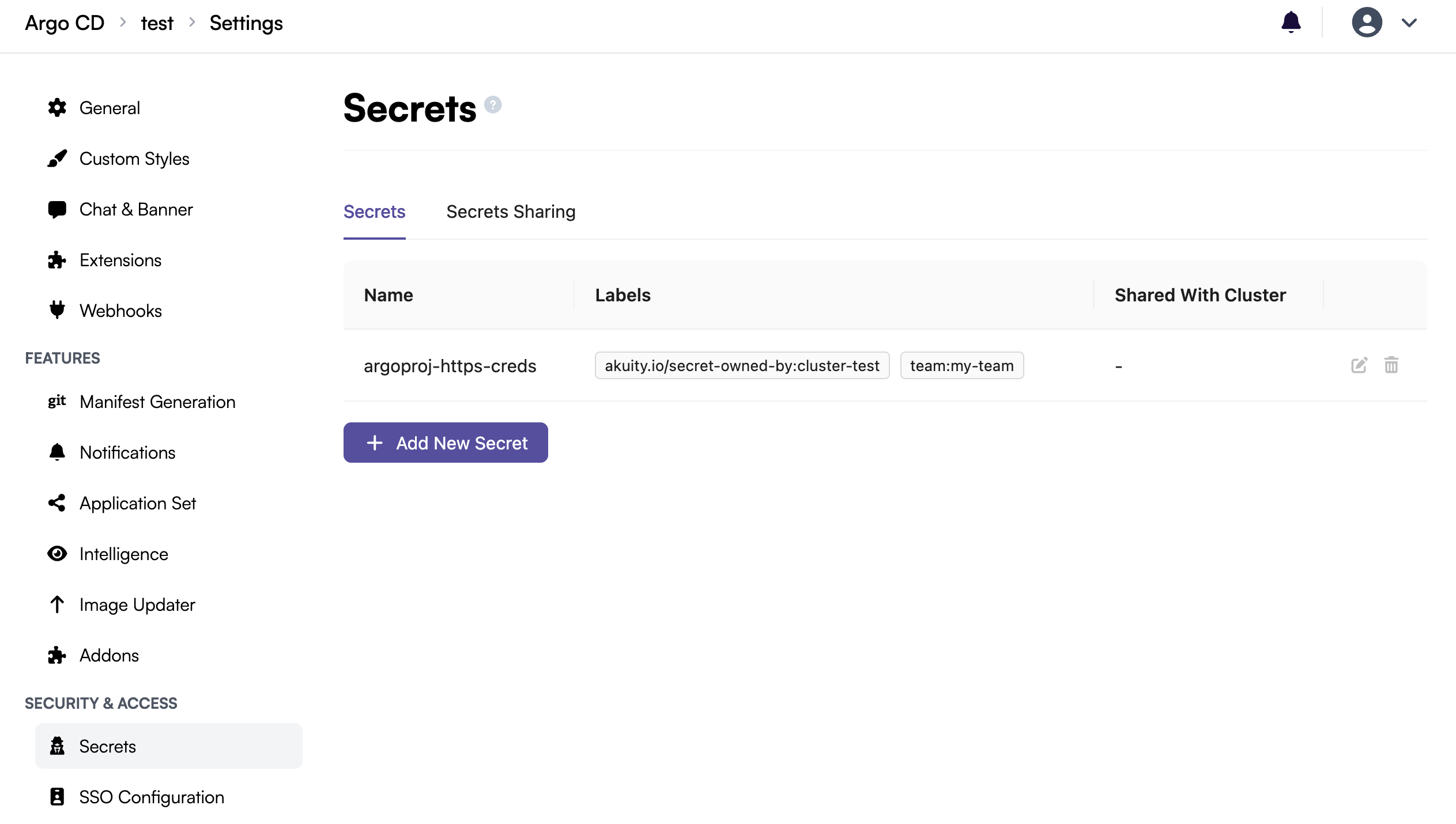
Once the secret is synced, you will see it appear in the managed secrets list in the "Secrets" settings of the instance:
Blocked Secrets
For security, certain secrets are never allowed to be synced/mutated by managed clusters.
Secrets that meet any of the following criteria are denied:
- Secrets with the following names:
argocd-secretargocd-initial-admin-secret
- Secrets of the following types:
kubernetes.io/service-account-token
- Secrets with the following labels:
argocd.argoproj.io/secret-type=cluster
Attempting to sync/mutate denied secrets will be rejected by the Akuity Platform.
Adoptable Secrets
Certain system secrets can be "adopted" by a managed cluster when synced. These secrets are pre-existing in the control plane, but when a managed cluster syncs its own version, the cluster takes ownership and the control plane defers to the cluster's values.
| Secret Name | Purpose |
|---|---|
argocd-notifications-secret | Notification service credentials (Slack tokens, email passwords, etc.) |
argocd-image-updater-secret | Image registry credentials for the Argo CD Image Updater |
application-set-secret | Credentials used by ApplicationSets (configured via the Application Set settings page) |
When a managed cluster adopts one of these secrets, the Akuity Platform UI will display a warning banner indicating which cluster owns the secret, and the edit controls will be disabled to prevent conflicting changes.
To modify an adopted secret, update it directly on the managed cluster that owns it.
To return control to the Akuity Platform, remove the akuity.io/secret-sync: "true" label
from the secret on the managed cluster, or delete the secret entirely from the managed cluster.
Once ownership is released, the warning banner will disappear and you'll be able to edit the secret
again from the Akuity Platform dashboard.
Creating and updating managed secrets
Managed secrets can be created and updated directly from the "Secrets" settings of the instance. Essentially, this is a convenience wrapper around creating a Kubernetes secret with some extra goodies to make syncing work, so it should look familiar.
- Create
- Update
- Delete
To create a managed secret, follow the steps below:
You can use a match expression to match labels on the clusters you wish to sync this secret to or you can allow it to sync to all clusters
To update an existing managed secret, click on the edit icon of the secret in the list you wish to edit and then edit any fields desired
To delete an existing managed secret, click on the delete icon of the secret in the list you wish to delete and then confirm the deletion.
Syncing Secrets to Managed Clusters
Secrets that are synced to the Argo CD control plane or created as managed secrets can also be synced back down to your managed clusters. This enables workflows where a cluster acts "seed" cluster that syncs to all of your other managed clusters.
Authorizing secrets to be synced
Each secret must be explicitly authorized to be synced to a cluster. This can be done on secret creation or by editing an existing secret:
All Clusters will sync the secret to all other clusters. Selected Clusters allows you to use a label selector to select which clusters the secret should be synced to. This should match the labels specified when connecting a cluster.
Advanced: Syncing from one cluster to other clusters
If you are managing secrets from one of your managed clusters, you "own" that secret and Akuity will not modify any of those secret values. In order to allow the secret to sync to other clusters, you'll need to add one or more of the annotations described below:
| Annotation | Description | Example Value |
|---|---|---|
akuity.io/managed-secret-allowed-cluster-selector | A set-based label selector that determines which clusters the secret is allowed to be synced to. | my-label in (cluster2) |
akuity.io/managed-secret-allowed-clusters | A comma-separated list of cluster names that the secret is allowed to be synced to. The reserved string ALL can be used to allow syncing to all clusters. | cluster2,cluster3 |
As an example, this is what the same Argo CD repo credentials secret would look like when created in a managed cluster and synced to a specific set of other clusters:
apiVersion: v1
kind: Secret
metadata:
  name: argoproj-https-creds
  namespace: akuity
  labels:
    argocd.argoproj.io/secret-type: repo-creds
    # This label is required to enable syncing of this secret
    akuity.io/secret-sync: "true"
    # This label could be used to select this secret for syncing
    team: my-team
  annotations:
    # Assumes you have a cluster with the label my-label=cluster2
    akuity.io/managed-secret-allowed-cluster-selector: my-label in (cluster2)
stringData:
  url: https://github.com/argoproj
  type: helm
  password: my-password
  username: my-username