MCP Access
The Akuity MCP Server lets MCP-compatible AI agents inspect and operate your Argo CD instance through authenticated tools. This page covers the instance's direct endpoint, https://<ARGO_CD_HOSTNAME>/mcp, which uses the instance's own authentication and RBAC.
If you sign in to the Akuity Platform, connect once to the platform endpoint instead. It reaches every MCP-enabled instance you have permission to access. The direct endpoint is for users who authenticate directly with this Argo CD instance and have no Akuity Platform organization access.
The Akuity MCP Server is available for selected organizations. Ask your Akuity representative to enable it for your organization.
The settings can be located by navigating to Argo CD → your instance → Settings → MCP Access.
Enable the direct endpoint
Enabling MCP access requires update permission on the instance. Organization Owner access is not required. The organization's guardrail level also applies to the direct endpoint.
- Go to Settings → MCP Access. You can also toggle access from Organization Settings → MCP Access → Instance access; its View instructions link opens this page in a new tab.
- Turn on Allow access to this instance, then click Save. Changes on this page are staged until you save.
- If the page shows an Identity provider callback, register it with your identity provider as described below before agents sign in.
- Wait for the instance to finish reconciling. The
/mcproute returns404until the new configuration is published. - Copy the endpoint
https://<ARGO_CD_HOSTNAME>/mcpor one of the connection snippets shown on the page.
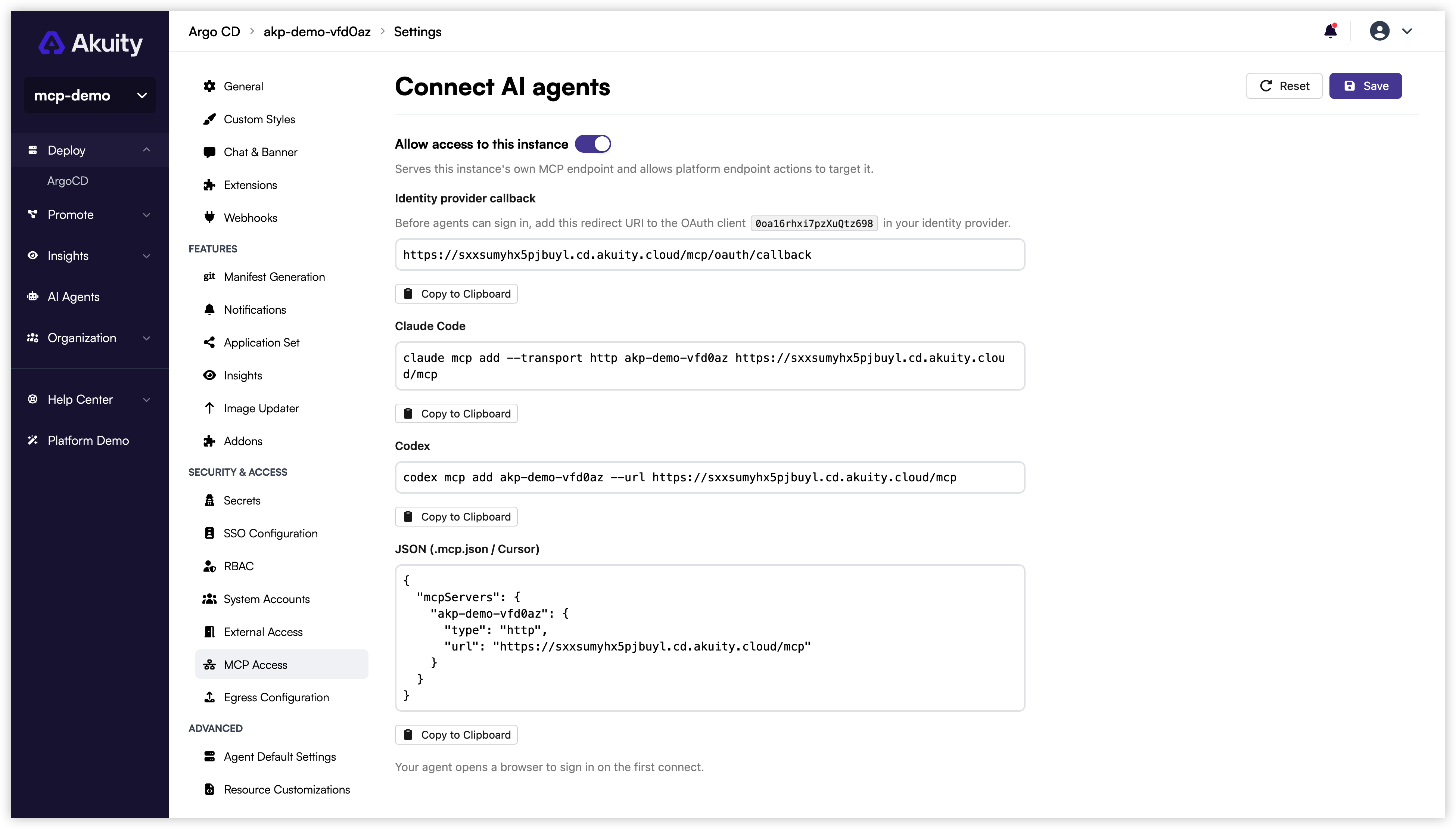
If this instance signs users in through direct OIDC, register https://<ARGO_CD_HOSTNAME>/mcp/oauth/callback as an allowed redirect URI on the Argo CD public OAuth client (cliClientID, or clientID when no client secret is set) before agents sign in. The MCP Access page shows the exact URI and client ID under Identity provider callback. Without it, the identity provider returns a redirect-mismatch error. Individual MCP client callbacks do not need to be registered.
Turning on access here serves this instance's own MCP endpoint and also allows platform endpoint actions to target the instance. It is the same toggle as MCP access in the organization's Instance access table.
Authentication
The direct endpoint uses the instance's existing authentication model. See Argo CD SSO for how SSO is configured on the instance.
| Instance configuration | Expected experience |
|---|---|
| Dex-backed SSO | The client opens the instance sign-in flow. Only loopback callbacks on the localhost hostname are accepted; 127.0.0.1, ::1, custom schemes, and hosted clients are not accepted by the embedded Dex configuration. |
| Direct OIDC | The client is sent to your identity provider through Akuity's callback on the instance host. Requires the extra redirect URI described above. |
| Local accounts (no SSO) | If a usable Argo CD local account is enabled, Akuity presents an instance sign-in form. The password is checked by the instance itself and the session lasts as long as the instance's native token (24 hours by default); the client signs in again when it expires. Loopback clients only. |
If browser sign-in is unavailable, the client can send a native Argo CD token as a bearer token instead.
Connect an MCP client
The portal shows the same snippets with the instance name as the server name. The client opens a browser to sign in with the instance's own authentication on the first connect.
- Claude Code
- Codex
- Cursor and JSON clients
claude mcp add --transport http argocd https://<ARGO_CD_HOSTNAME>/mcp
codex mcp add argocd --url https://<ARGO_CD_HOSTNAME>/mcp
{
  "mcpServers": {
    "argocd": {
      "type": "http",
      "url": "https://<ARGO_CD_HOSTNAME>/mcp"
    }
  }
}
Verify the connection
Confirm that the client reports the server as connected, then use a prompt like the following:
List the applications in this Argo CD instance and summarize any that are degraded or out of sync.

For sign-in problems, missing tools, and guardrail errors, see Troubleshooting. For the tools available on this endpoint, see the tool reference.