Kargo Secrets
The Akuity Platform provides a way to synchronize secrets from your managed clusters to the Akuity-hosted Kargo instance. This capability is built in to the platform and requires no additional configuration to enable in your clusters.
This feature requires Agent version 0.5.75 or greater.
Syncing Secrets to the Kargo Control Plane
In order to sync secrets to the control plane, you will need to have a Self-Hosted Kargo agent installed in your cluster. This can be done when registering an agent in the the "Agents" tab of the Kargo instance.
Selecting which Secrets to Sync
For security, secrets will not synced unless explicitly allowed by a control plane administrator. This can be done in the "Secrets" settings of the instance as shown below:
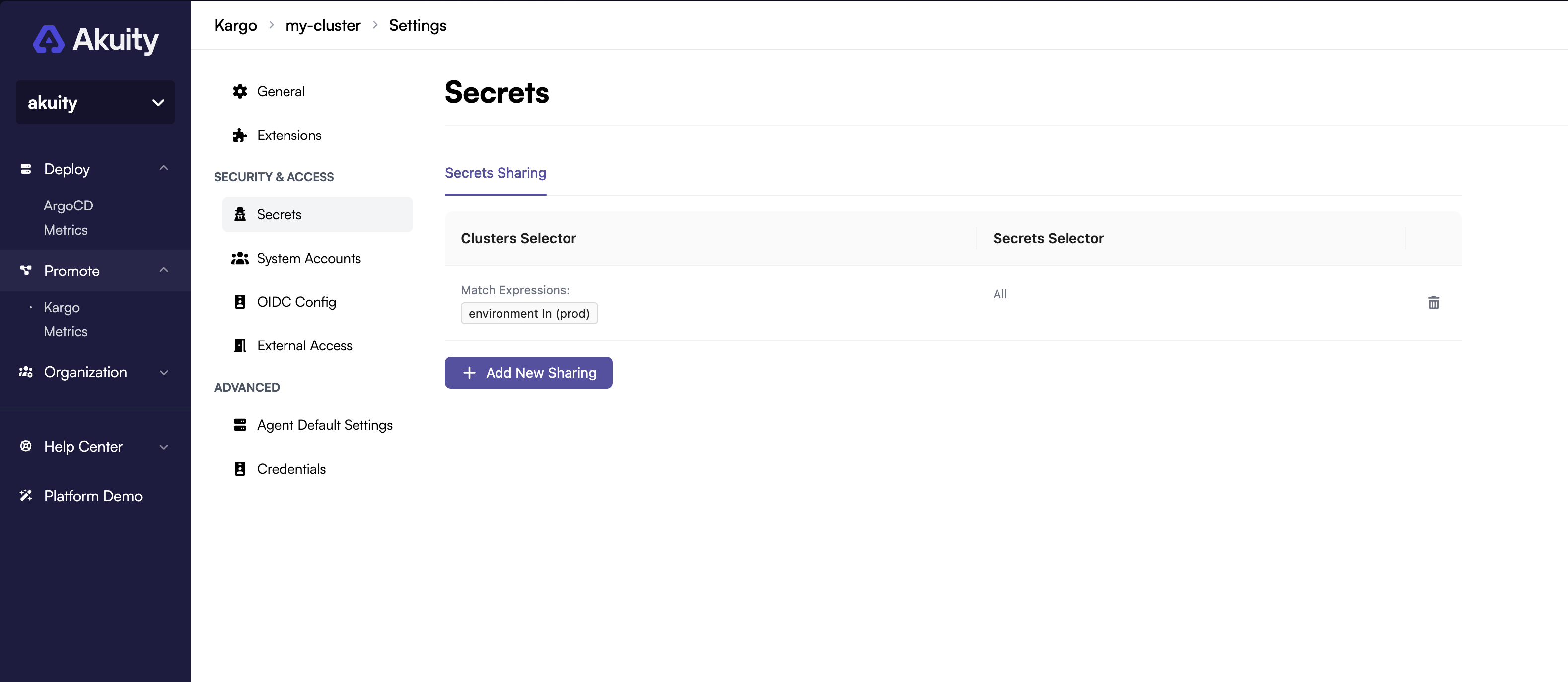
Allowed secrets are configured by creating a Secret Source. A Secret Source has two fields, one of which must always be set:
-
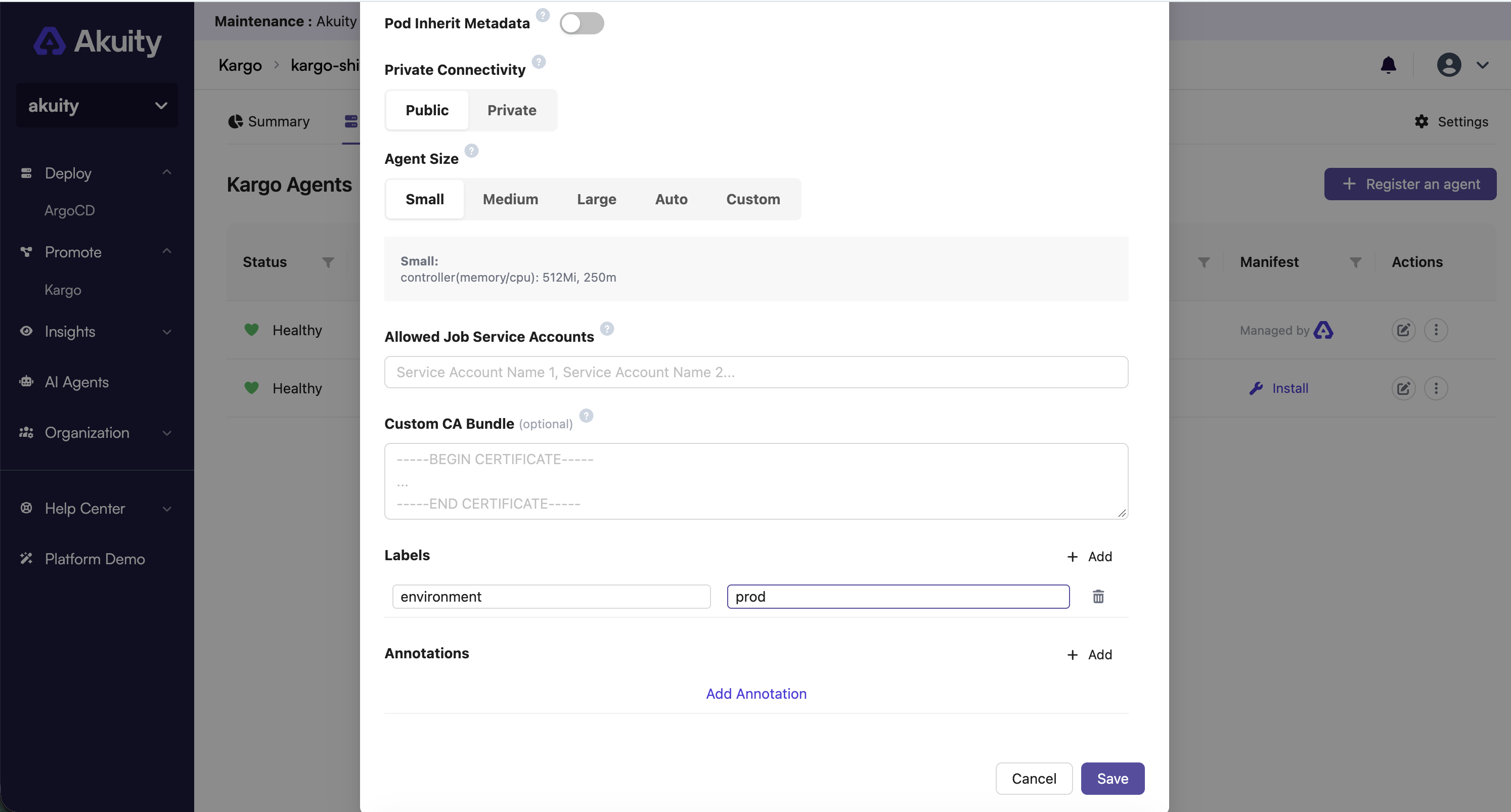
Cluster Selector: A label selector for the clusters you wish to sync secrets from. The cluster labels are specified when configuring a Kargo agent to connect the cluster to the Akuity Platform. If this field is left empty, then the Label Selector will match secrets from all clusters.
For self-hosted agents, make sure to add the required labels to the cluster. For example, if the cluster has the label
environment: prod, you can useenvironment = prodas the Cluster Selector.The following example shows where to configure the cluster labels when setting up a self-hosted agent:
-
Secret Selector: A set-based label selector for the secrets you wish to sync. If this field is left empty, then the Label Selector will match all secrets for all matching clusters
You can use both Cluster and Label selectors to select specific secrets from specific clusters for more fine grained control
Creating Secrets
If you create a secret syncing selector after creating a secret in your Kubernetes cluster, the secret will not sync until Kubernetes resyncs or you reapply the secret. This is due to the limitation of the Kubernetes API, which only informs when a secret is updated/created.
To sync secrets from your managed clusters to the Kargo control plane, you need to create a secret in your managed cluster with the appropriate label. The Akuity agent will automatically detect these secrets and sync them to the Kargo control plane.
You can create the secret in the Agent namespace within a managed cluster (akuity by default). In
order to sync the secret, it must have two labels set. This first is a kargo.akuity.io/secret-sync
label with a value of an existing Kargo project name or one of the cluster secrets namespaces
(kargo-cluster-secrets in <= 1.8 or kargo-shared-resources and kargo-system-resources in >=
1.9). If the project does not exist, the secret will fail to sync. The second label is the
kargo.akuity.io/cred-type
label
which needs to be a value of git, helm, image, or generic, depending on the type of secret
you are creating. If either of these labels are missing, the secret will be ignored and will not
sync.
If you used a label selector when creating the Secret Source, make sure that the secret also has the appropriate labels to match the selector.
Here is an example secret that can be used to sync a generic credential:
apiVersion: v1
kind: Secret
metadata:
  name: webhook-credentials
  namespace: akuity
  labels:
    # These labels are required to enable syncing of this secret
    kargo.akuity.io/secret-sync: "kargo-demo"
    kargo.akuity.io/cred-type: "generic"
stringData:
  password: my-password
  username: my-username
Because secrets are synced all from the Agent namespace, make sure to choose unique names for your secrets to avoid name collisions.
Updating Secrets
Any changes to the secret will be automatically synced to the Kargo control plane. You can also
change the project that the secret is synced to by updating the kargo.akuity.io/secret-sync label
to a different project name. This will delete it from the old project and create it in the new
project.
Secret Ownership
It is possible to have multiple clusters syncing secrets to the Kargo control plane. Please note
that it is up to you as the user to make sure you use unique secret names when syncing to the same
projects. If two clusters are attempting to sync a secret named webhook-credentials to the same
project, the first create wins. The second secret will fail to sync with an error in the agent
logs indicating that the secret already exists and isn't owned by the agent's cluster.